 OWNER'S KIT · Rev B · October 2026
LumiRope 360
22mm Black · Operator Guide
How to power, connect, rig, run and care for your LumiRope 360 pixel rope, PXL-CTRL-4 controllers, NL4 feeders and rigging rings.
 info@kg3.io · +1 888 969 6366 · kg3.io02 READ THIS FIRST
Read this first
Your LumiRope system is touring grade, and it is also low voltage electronics. Five minutes on this page prevents almost every failure we see.
The colour code
Used the same way on every page, label and diagram in this guide.
Eight rules that protect the gear and the crew
Never make or break an NL4 with power on
Switch the controller off (pull its TRUE1), and any power injector, before you plug or unplug any feeder or rope.
Never bend tighter than 50 mm (2 in)
Measured to the centreline of the rope. Kinks crack the pixel board inside.
Never hang the rope by its leads
Weight goes on rigging rings only. Leads, connectors and end caps carry nothing.
Never cut, pierce or modify the rope
The ends are sealed. A cut or pierced rope loses its seal and its IP67 rating.
The rope is IP67. The connectors are not.
NL4 joints and controller plates must stay dry, off the ground and out of standing water.
Data runs one way: INPUT to OUTPUT
Only the INPUT end plugs into a controller. Over 7.8 m needs power at both ends. See pages 8 and 9.
Rigging is for qualified riggers
Follow the venue and local rigging rules. Use secondary safeties.
Test on the ground first
Light every piece at full white and in red, green and blue before it flies.
03 WHAT'S IN THE KITWhat's in the kit
Four parts make the whole system. Everything plugs together with the same NL4 connector, so there is only one cable type to learn.
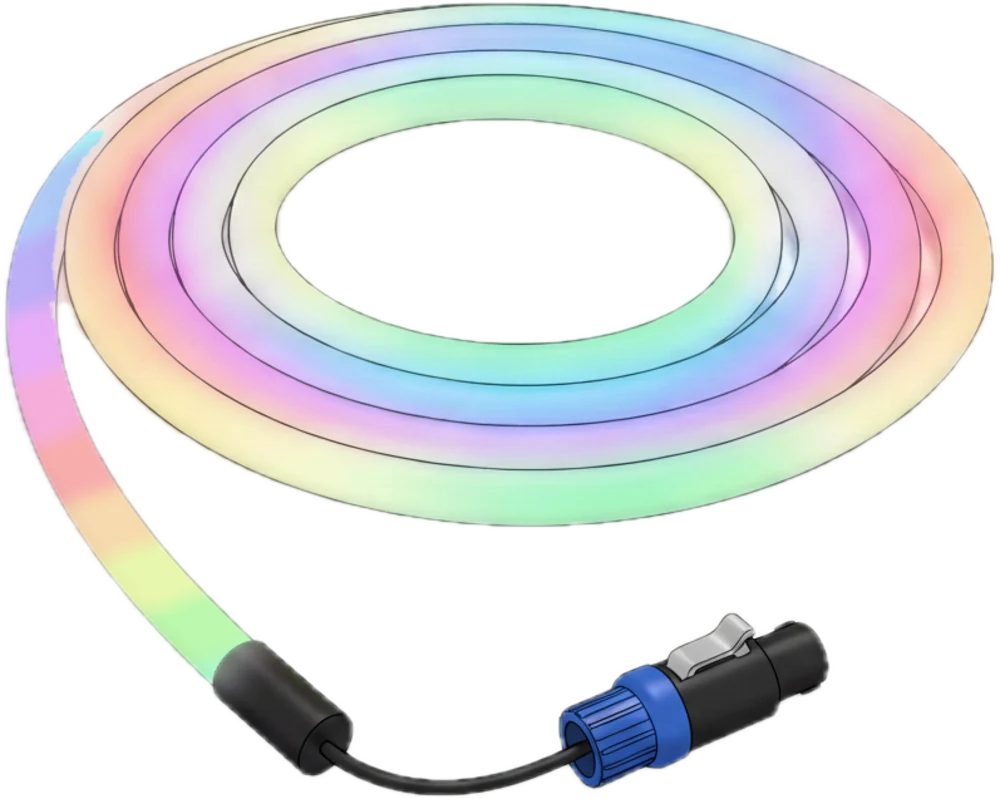 Shown lit
LumiRope 360 22mm Black
The light.
- WS2811 RGB pixels, 20 per metre
- 24 VDC, full 360° glow
- Black jacket, IP67
- NL4 lead at each end
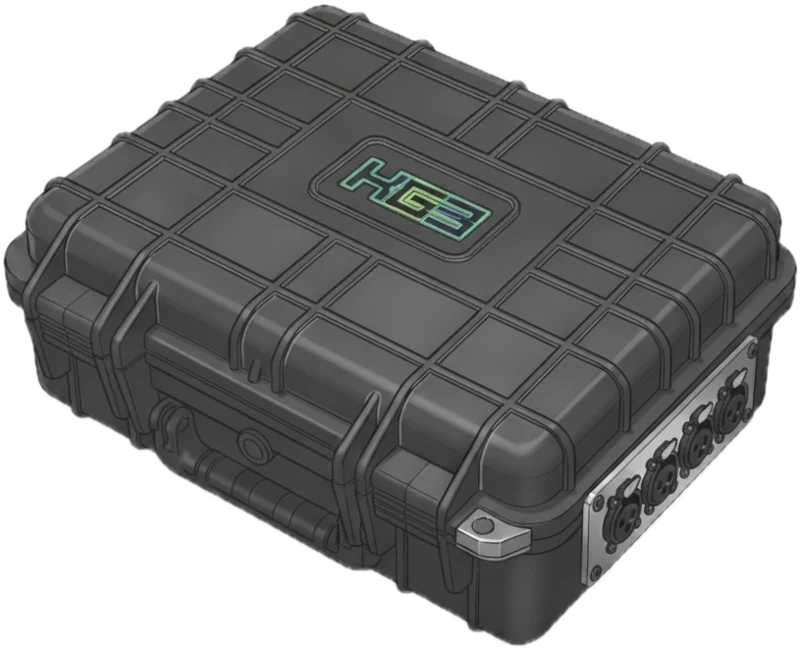
PXL-CTRL-4 Controller
The brain and the power.
- Network data in, pixel data out
- 600 W, 24 VDC supply inside
- 4 powered NL4 outputs
- TRUE1 power in + thru
NL4 Feeder
Carries power and data to the rope.
- 16/3 SJOOW rubber cable
- speakON NL4 plug each end
- Joins with an NL4 coupler
- 10 ft or 20 ft lengths
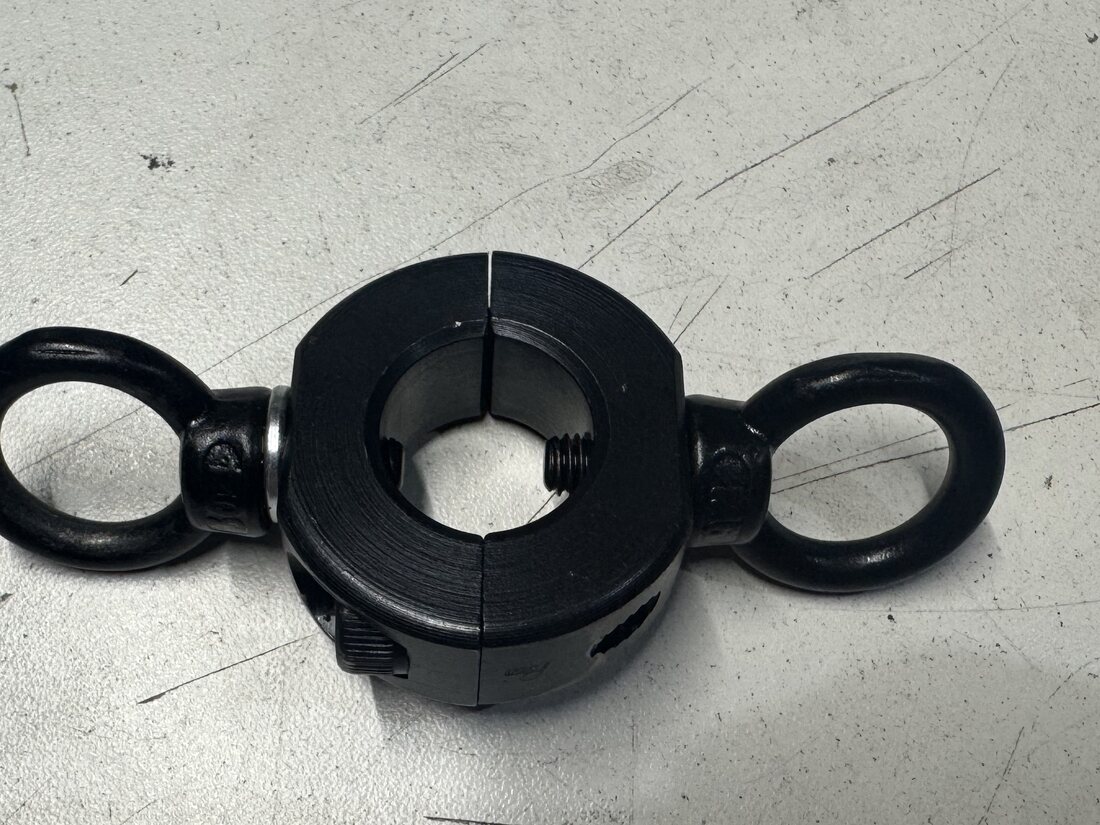
Rigging Ring
Holds the rope at a pick point.
- Collar clamps the 22 mm rope
- Eye each side for rigging
- 2 x M6 cap screws
- 5 mm hex key
04 HOW IT FITS TOGETHERHow it fits together
One pixel output drives one rope. Data always enters at the INPUT end and travels toward the OUTPUT end.
Data
Your console sends sACN over the lighting network. Each controller listens for its own universes.
Power
AC comes in on TRUE1. The 600 W supply inside makes 24 VDC for the rope.
Output
Each NL4 output sends 24 V and pixel data down one feeder to one rope INPUT end.
Second feed
Longer runs also get power at the OUTPUT end: a power injector, or a PXL-CTRL-4 output set to 0 pixels.
Never send data into an OUTPUT end
Data is directional. Only the INPUT end plugs into a pixel output. The OUTPUT end is data out to the next rope (daisy chain), or power only.
05 LUMIROPE 360 22mmLumiRope 360 22mm
A black silicone rope that reads as plain cable when off and glows full colour from every angle when on.
Reading the end labels
Every rope carries a label at each end, on the lead just behind the connector.
- INPUT or OUTPUT: which end you are holding. Data goes in at INPUT and out at OUTPUT.
- Piece number: the same number is on both ends of the same rope.
- Length and pixel count: pixels = metres x 20.
- Electrical spec: pixel type, voltage and full-white power.
Pixel 1 is always at the INPUT end
Patch and program from INPUT toward OUTPUT.
Black jacket, hot stage
The rope is dark and absorbs heat in direct sun. Keep it off hot surfaces and lamps.
06 HANDLING THE ROPEHandling the rope
Most rope damage happens on the ground, not in the air. Treat it like a fibre optic cable: gentle curves, no kinks, no weight on the ends.
Unroll it like a hose
Roll the coil along the floor to pay it out. Pulling loops off the side puts a twist in every turn.
Coil in big, loose loops
About 21 in (530 mm) across, the same donut it ships in. Velcro, never tape or tight ties.
Carry by the coil
Support the coil, not the leads. A 10 m piece weighs about 9 to 10 lb.
Never step on it, roll a case over it or pinch it in a truss clamp
Never drag it, or drag a connector across the deck
Never twist the rope to make it lie flat
Rotate the coil instead. Twists come back as kinks.
07 PXL-CTRL-4 CONTROLLERPXL-CTRL-4 controller
One box takes AC power and network data in, and sends 24 V power and pixel data out on four NL4 outputs.
An Advatek PixLite A4-S Mk3 pixel controller and a Mean Well 600 W, 24 V supply, in a hard case with stainless connector plates.
Not rated for rain
Keep the lid latched, keep the box covered and out of standing water, and shade it from direct sun. It runs warm at full load.
Never open the case
Mains voltage inside. Service by KG3 only.
08 DC POWER MANAGEMENTDC power management
Every metre of rope draws 0.96 A at full white. Each controller output can carry 7.5 A. Plan for full white, because sooner or later someone will run it.
| LumiRope 360 22mm Black 0.96 A/m · 23 W/m at full white | One feed INPUT only | With power injection INPUT + OUTPUT end |
|---|---|---|
| Absolute max at 100% brightness 7.5 A per output | 7.8 m156 px · 25 ft 7 in | 15.6 m312 px · 51 ft 2 in |
| Recommendedplan to this 80% headroom, 6 A per output | 6.2 m124 px · 20 ft 4 in | 12.4 m248 px · 40 ft 8 in |
Lengths are per controller output, at full white. A run is everything on that output: linked ropes count as one run, so add their lengths together. A run longer than the injection max needs another output.
Your pieces at full white
| Piece | Pixels | Full white | Power | Per feed | Feed |
|---|---|---|---|---|---|
| 5 m | 100 | 4.8 A | 115 W | 4.8 A | INPUT only |
| 10 m | 200 | 9.6 A | 230 W | 4.8 A x 2 | BOTH ends |
| 11 m | 220 | 10.6 A | 253 W | 5.3 A x 2 | BOTH ends |
Budget per output
Hard limit 7.5 A. Plan no more than 6 A (80%) on any one output.
Budget per controller
All four outputs share one 600 W supply (25 A). Plan no more than 480 W, about 20 m of rope at full white, per box.
Budget per AC circuit
Allow 700 W per box. On a 20 A circuit loaded to 80%: 2 boxes at 120 V, 4 boxes at 208 V.
09 CONNECTING + FEEDINGConnecting and feeding
Pixel data flows one direction down the rope. Get the INPUT end right and everything else follows.
The feed rule
NL4 pin use
The same on every feeder, rope lead and output. Power-only feeds use the same pins.
Data is one way
- INPUT end plugs into a controller output. It takes power and data. Only the INPUT end ever takes data.
- OUTPUT end is one of two things: data out, daisy chained to the next rope's INPUT with an NL4 coupler, or power only, a power injection. Or it stays unplugged.
- Linked ropes are one run. Two 5 m pieces linked = a 10 m run: it needs power at the far end, just like a 10 m piece.
- Power injection comes from a power injector, or from any PXL-CTRL-4 output set to 0 pixels. A spare controller makes a good injector.
Never plug an OUTPUT end into a pixel output
If a rope stays dark, check you have the INPUT end on the controller. Swap ends, never force it.
Inject at the OUTPUT end
Power at both ends keeps whites even from end to end and halves the load on each feed.
10 RIGGINGRigging
The rope is light, about 0.42 kg per metre, but it is not a rigging cable. Rings carry it, everything else hangs free.
- Rings take the weight. Three rings per 10 m or 11 m piece: one close to each end, one in the middle. Shorter pieces: one close to each end. Your rigging plan sets the exact points.
- Service loop at each end. Leave the lead in a relaxed loop below the ring, never pulled tight.
- Tie off every NL4 joint to the truss with tie-line, so no connector hangs on a lead.
- Gentle sag only. Keep every curve, including at the rings, to 50 mm (2 in) radius or more.
Fitting a ring
Open the collar, seat the rope, then tighten the two M6 cap screws evenly with the 5 mm hex key. Stop when the ring will not slide under the rope's own weight. Firm, not forced.
Never crush the jacket
If the rope bulges or flattens at the collar, back the screws off. Over-tightening damages the pixels under the ring.
Rings hold the rope only
Never hang anything else from a ring. Use rated rigging hardware and a secondary safety at every pick, per venue rules.
11 CONTROLLER SETUPController setup
Your console only needs to know each controller's IP address and universes. Everything else lives inside the box.
Typical settings
| Protocol | sACN (E1.31) |
|---|---|
| Pixel IC | WS2811 |
| Colour order | RGB, confirm with a test |
| Data speed | 800 kHz |
| Pixels per universe | 170 (510 channels) |
| Pixels per output | rope metres x 20 |
| Pixel 1 | at the rope INPUT end |
| Network | static IP, one unique address per box |
| Firmware | PixLite Mk3 3.15.0 as shipped |
Changing a setting
- Connect a laptop to the same network switch.
- Open Advatek Assistant (free, Mac and Windows). It finds every PixLite on the network.
- Save a backup of the controller's settings before you touch anything.
- Change only what you need: IP address or start universe.
- Save to the controller, then run the test pattern.
Test pattern reads red, green, blue
If red and green swap, fix the colour order on the controller output. Never fix it in the console patch.
Run it as delivered
Each box ships set up and labelled. Change settings only when your show needs it, and back up first.
Never update firmware during a show period
Firmware changes are a bench job. Ask KG3 first.
12 CHECKLISTSChecklists
Tick these off every time. They take minutes and catch nearly every problem before an audience does.
Before it flies
- Jacket: no cuts, flat spots or kinks
- End caps and leads intact
- NL4 plugs clean, latch with a click
- Rings fitted and snug, not crushing
- Piece lights at full white end to end
- Red, green, blue each look correct
Power up
- All NL4 joints made with power OFF
- Network cable in, switch powered
- Console sending, or blackout set
- Apply AC to each controller and injector
- Run a low level test, then full white
- Walk every piece: no dark pixels
Shut down
- Blackout from the console
- Remove AC from each controller and injector
- Wait for the rope to go fully dark
- Only now disconnect NL4 feeders
Every day of the run
- Look for rub points on truss edges
- Check connectors are dry and tied off
- Check rings have not slipped
- Look for any dim or flickering section
13 TROUBLESHOOTINGTroubleshooting
Start with the simplest thing. Nine times out of ten it is a connector or a setting.
| You see | Check, in this order |
|---|---|
| A whole rope is dark | Is the INPUT end on the controller? Is the controller powered? Is the feeder latched at both ends? With AC off, swap in a known good feeder or move to another output. |
| Rope lit but ignores the console | Network link light on? Controller IP on the same subnet? Universe in the console matches the controller? |
| Red and green are swapped | Colour order on that controller output. Fix it there, never in the patch. |
| A pixel shows past the end of the jacket | Normal: the tape slides inside the tube. Never force it back. Leave that pixel out of the patch. |
| Dark from one point onward | Data stops at that pixel. Check the rope for damage at that spot. Do not cut it. Call KG3. |
| Far end dim or warm at full white | Whites turn orange or pink toward the end: the OUTPUT end has no power. Check the second feed and its connectors. |
| Flicker or random colours | A loose or wet NL4 joint, or a damaged feeder. With AC off: reseat, dry, or swap the feeder. |
| An output keeps shutting off | Too much load or a short. With AC off, unplug the rope, inspect the feeder, check the run is inside the DC power table on page 8. It resets on its own. |
Swap, then diagnose
During a show, kill AC to that box, swap the feeder or move to a spare output, then power up. Find the cause afterwards.
Never open a rope, connector or controller
There are no user-serviceable parts. Tag it, set it aside and call KG3.
Calling KG3? Have this ready
14 CARE, STORAGE + TRANSPORTCare, storage and transport
Looked after, LumiRope lasts for years of touring. Most of that is simply keeping it dry, clean and loosely coiled.
Clean
Wipe the jacket with a damp cloth and mild soap. Let it dry fully before coiling.
No solvents, alcohol or pressure washers
Store
Indoors, dry, out of direct sun. Coiled loosely in its 21 in donut, lying flat. Nothing heavy stacked on the coils.
Dry connectors before casing
Moisture trapped in an NL4 corrodes the contacts.
Transport
Pack it the way it arrived. Every piece has a home in the road cases, so nothing rides loose.
Photograph each case when it arrives
The photo is the best packing guide you will ever have.
Packing a rope case
Typical layout. Your cases may differ, so follow the photo you took on arrival.
- Rope coils lie flat in the rope bay, leads tucked into the middle of each coil.
- Feeders coiled over-under, in the cable bay.
- Rings, hex key and NL4 couplers together in the trough.
- Controllers in their own space, lids latched, never under rope.
15 / 15
Custom LED lighting and scenic fabrication, Nashville, Tennessee.
Questions, repairs, more rope or a hand on site: talk to us.
slm.kg3.io
LumiRope 360 22mm System · Operator Guide · Rev B · October 2026